
In September 2026, My Best Practice added a setting that lets an owner require a new client to add a card during the intake packet and make that card the client's autopay method (if the practice chooses to use autopay). In the same release, an owner can turn on Send Credit Card Receipt to Clients, and a client then receives an email receipt as soon as the card payment is approved.
A biller can use Auto Allocation, also new in September, to apply a payment to the oldest outstanding appointment balances on a client's account. The biller can also run a client balances report by outstanding balance, unpaid sessions, or days since last seen.
How does billing work for a group practice in My Best Practice?
A biller on My Best Practice can submit claims, track payments, manage invoices, and bill in-network and out-of-network clients from one system. A private-pay client can open their invoices, superbills, and receipts in the client portal without the owner or a clinician preparing them, and a biller can charge the client's card on file or leave it to autopay. An owner can enter a default billed rate per CPT code for each clinician; a rate entered on a client's chart overrides it.
The core EHR costs $39 a month for the first clinician and $19 for each additional one, and telehealth is $20 a month per clinician.
| Clinicians | Core EHR | Telehealth for every clinician |
|---|---|---|
| 5 | $115 | $215 |
| 10 | $210 | $410 |
| 15 | $305 | $605 |
Monthly subscription at list prices; billing plans, AI Notes, e-prescribing, card processing, and migration cost extra.
Schedulers, billers, and bookkeepers are all free, no matter how many, and a non-clinical staff member made a basic administrator can view billing, payroll, and client lists for every clinician but cannot change account settings.
Does My Best Practice send superbills automatically and invoice clients in batches?
Yes. An owner can turn on automatic weekly or monthly superbills once. For monthly superbills, the owner picks the 1st, 3rd, or 15th of the month; on that day, every client with billed appointments in the previous month receives a superbill listing those appointments, and an email that it is in the client portal under Documents. An owner can keep any particular client out of the run with the Prevent Superbill checkbox on the client's chart, and a client can generate their own superbill in the portal as often as they like for any custom date range.
A biller can use Bulk Invoice for one client seen by several clinicians and download one PDF per clinician for the date range.
For a group session, the clinician assigned to the appointment on the calendar is the one named on each member's superbill, and a biller can enter a different CPT code and fee for a member who pays a different amount.
When does autopay charge a client's card in My Best Practice?
An owner can enable autopay once for the practice, and also choose any particular clients for whom they don't want it to apply. There is total optionality. It can all be handled from the Payment Methods tab. A client enrolled in autopay pays the whole outstanding balance from their card around 10 PM Eastern on the evening of any appointment, if a balance is due. A biller or any staff member can receive an email with the Pre-Autopay Report about an hour before to see who is to be charged that evening and mark any appointment missed if it didn’t occur. The practice will be notified of any declined cards, and the system will automatically run the card again for three consecutive days in case it was declined temporarily because of a low balance or a fraud alert.
A client can add their own card in the portal under Payments & Invoices, and a biller or other staff member can add one from the client's Payment Methods tab.
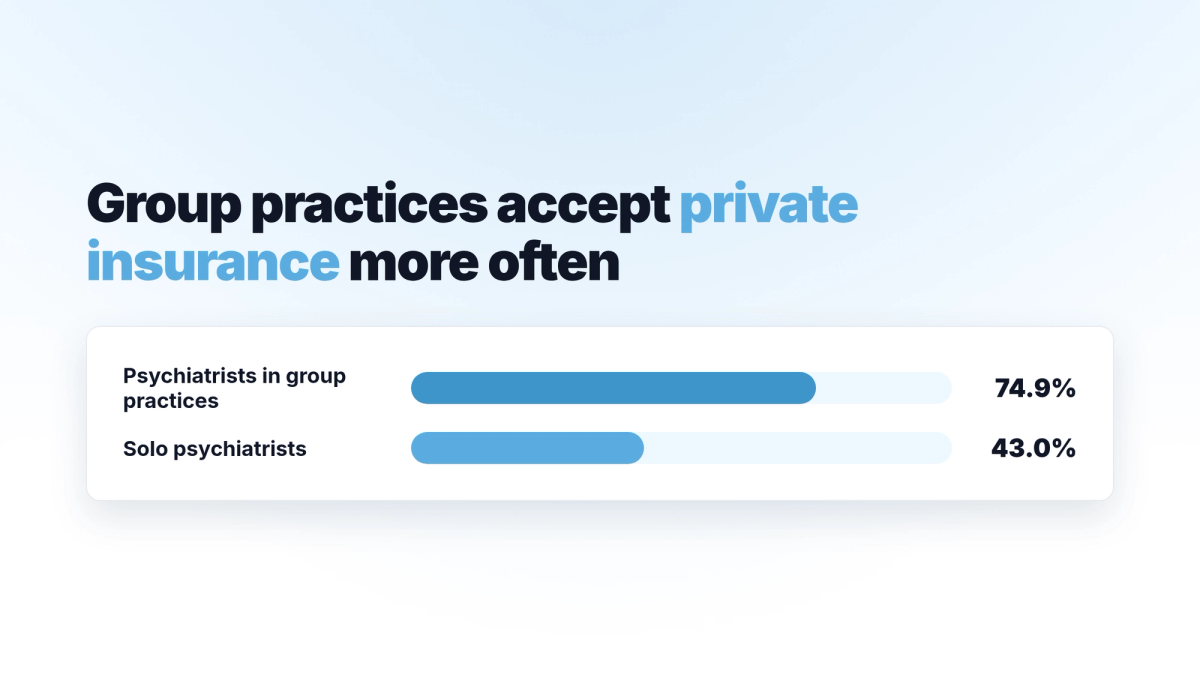
Group practices accept insurance more often than solo clinicians
A 2014 analysis of a national survey of office-based physicians found that in 2009 and 2010, 74.9% of psychiatrists in group practices accepted new clients with private fee-for-service insurance, against 43.0% of solo psychiatrists. Of the 175,083 psychotherapy and counseling providers listed on Psychology Today at the end of 2023, 64.9% accepted some form of insurance, and group-affiliated providers were more common among those who accepted it (42.2%) than among those who did not (36.6%).
In employer-sponsored plans from 2007 to 2017, the negotiated price of an in-network adult psychotherapy visit fell from $98.10 to $84.47 in 2016 dollars, while the out-of-network price rose from $123.30 to $148.64.
Low reimbursement ranked first among reasons to stay out of network in a 2024 to 2025 survey of 326 private-practice clinicians who took no insurance for at least half their caseload, for Medicare, Medicaid, and commercial insurance alike. When those clinicians wrote in reasons the list had missed, the most common was an insurer clawing back a payment it had already made. The work of submitting claims ranked second.
What a biller can do with claims, ERAs, and eligibility on a group practice EHR
A biller can turn on Auto File Claims, and each claim then goes out once the clinician has signed the note and the session carries a service code, a diagnosis, a location code, and the client's address and date of birth. A biller can turn on Auto Post Insurance Payments & Denials, and then reads the insurer's payments and denials from each ERA, the electronic payment report an insurer sends back, already posted to the client's account. With Auto Update Patient Responsibility on, the biller reads the client's copay updated from the same ERA as well.
A biller can check a client's eligibility from the Claim Center tab and read the benefits the payer returns. For an out-of-network client, a biller can file the claim or hand the client a completed claim form to submit themselves, and can choose whether the payer pays the practice or the client.
| Billing plan | Monthly price | What it covers |
|---|---|---|
| Free | $0 | The first 20 claims a month are free; each additional claim, and each ERA or eligibility check, is 35 cents |
| Unlimited | $99 a month for the whole practice | Unlimited claims and ERAs |
| Enterprise | $199 a month | Unlimited claims and ERAs, a clearinghouse login, and premium support |
How does an owner set each clinician's pay per CPT code?
An owner can enter, for each clinician, a pay rate or a pay percentage for each CPT code. A pay rate is a set amount for every session with that code, such as $100 for every 90834 session, whatever was charged. A pay percentage is a share of what the session was billed, so a clinician on 0.6 is paid $60 on a $100 session and $120 on a $200 session. In a group session, each client who attends has their own record for that session and is counted individually, not as part of the group. An owner can fill in one column per code, either the rate or the percentage, and a salary entered on a clinician's profile appears for that clinician in the payroll report.
At month's end, an owner can open the payroll report to determine what each clinician is to be paid, computed from those per-code entries. An owner can also run the Billed vs. Collected report by clinician, facility, or team.
Each month, a group of ten clinicians, all with telehealth, pays $410 for the subscription. If it bills insurance, the claim fees land on the Free plan or the $99 Unlimited plan, depending on how many claims it files; the practice can pick the best plan. My Best Practice charges 2.94% plus 37 cents for each card payment, so the practice pays $5.52 in processing on a $175 session. When the eleventh clinician joins, the bill rises by $19, or $39 with telehealth, and at twenty clinicians the subscription is $400, or $800 with telehealth for everyone.
Open a 14-day free trial; it includes telehealth and needs no credit card.
Disclaimer: This post is for general information only. It does not provide legal, ethical, or clinical guidance, and it is not a substitute for advice from an attorney, your licensing board, your professional association, or a qualified clinical supervisor or consultant. Before making decisions about your staff, your compliance obligations, or client care, consult the appropriate professionals.
References
- Benson, N. M., & Song, Z. (2020). Prices and cost sharing for psychotherapy in network versus out of network in the United States. Health Affairs, 39(7), 1210-1218. https://doi.org/10.1377/hlthaff.2019.01468
- Bishop, T. F., Press, M. J., Keyhani, S., & Pincus, H. A. (2014). Acceptance of insurance by psychiatrists and the implications for access to mental health care. JAMA Psychiatry, 71(2), 176-181. https://doi.org/10.1001/jamapsychiatry.2013.2862
- Centers for Medicare & Medicaid Services. (n.d.). Health care payment and remittance advice. https://www.cms.gov/medicare/billing/electronicbillingeditrans/remittance
- Lehrbach, K. R., Last, B. S., Rawa, E., Zweben, D., Adams, D. R., Hantula, D. A., Littlewood, A., Kendall, P. C., & Crane, M. E. (2026). Using demand analysis to examine private practice mental health providers' decision to accept health insurance. Administration and Policy in Mental Health and Mental Health Services Research, 53(4), 451-461. https://doi.org/10.1007/s10488-026-01507-9
- My Best Practice. (n.d.). Features. https://www.mbpractice.com/features
- My Best Practice. (n.d.). Frequently asked questions. https://www.mbpractice.com/faqs-frequently-asked-questions/
- My Best Practice. (n.d.). Pricing and insurance. https://www.mbpractice.com/pricing-and-insurance/
- My Best Practice. (2026, October 21). How a 15-clinician practice would run on My Best Practice: Locations, access levels, payroll, and what it costs. https://www.mbpractice.com/blog/15-clinician-group-practice-my-best-practice-cost/
- My Best Practice. (2026, October 28). My Best Practice vs. TherapyNotes for group practices. https://www.mbpractice.com/blog/my-best-practice-vs-therapynotes-group-practices/
- My Best Practice Support Center. (n.d.). Auto-allocation. https://mbpracticesupport.zohodesk.com/portal/en/kb/articles/auto-al
- My Best Practice Support Center. (n.d.). Automated credit card receipts. https://mbpracticesupport.zohodesk.com/portal/en/kb/articles/automated-credit-card-receipts
- My Best Practice Support Center. (n.d.). Billed vs. Collected report: Overview & how to use all filters (Facility, Clinician, Team). https://mbpracticesupport.zohodesk.com/portal/en/kb/articles/running-billing-reports
- My Best Practice Support Center. (n.d.). Client balances report within the To-Do List. https://mbpracticesupport.zohodesk.com/portal/en/kb/articles/search-patient-balances
- My Best Practice Support Center. (n.d.). Client portal: Entering payment information & completing consent paperwork. https://mbpracticesupport.zohodesk.com/portal/en/kb/articles/ccinformation-consentpaperwork
- My Best Practice Support Center. (n.d.). Client portal: Making payments. https://mbpracticesupport.zohodesk.com/portal/en/kb/articles/makin
- My Best Practice Support Center. (n.d.). Configuring staff & user settings. https://mbpracticesupport.zohodesk.com/portal/en/kb/articles/configuring-staff-user-settings
- My Best Practice Support Center. (n.d.). Creating bulk invoices. https://mbpracticesupport.zohodesk.com/portal/en/kb/articles/creating-bulk-invoices
- My Best Practice Support Center. (n.d.). Creating client or staff groups. https://mbpracticesupport.zohodesk.com/portal/en/kb/articles/creating-client-or-staff-groups
- My Best Practice Support Center. (n.d.). Creating invoices/superbills. https://mbpracticesupport.zohodesk.com/portal/en/kb/articles/creating-invoices-superbills
- My Best Practice Support Center. (n.d.). Generating invoices/superbills in the client portal. https://mbpracticesupport.zohodesk.com/portal/en/kb/articles/generating-invoices-superbills
- My Best Practice Support Center. (n.d.). How to add payment methods and take payments. https://mbpracticesupport.zohodesk.com/portal/en/kb/articles/how-to-add-and-manage-payment-methods-in-the-platform
- My Best Practice Support Center. (n.d.). Instructions for generating superbills/invoices (email template). https://mbpracticesupport.zohodesk.com/portal/en/kb/articles/instructions-for-generating-superbills-invoices-email-template
- My Best Practice Support Center. (n.d.). Insurance automation options. https://mbpracticesupport.zohodesk.com/portal/en/kb/articles/insurance-automation
- My Best Practice Support Center. (n.d.). Packet prompts: Add/require payment method (with autopay) and/or add/require insurance plan. https://mbpracticesupport.zohodesk.com/portal/en/kb/articles/packet-prompt-add-payment-method-and-or-add-insurance-plan
- My Best Practice Support Center. (n.d.). Setting up automatic monthly superbills. https://mbpracticesupport.zohodesk.com/portal/en/kb/articles/setting-up-automatic-monthly-superbills
- My Best Practice Support Center. (n.d.). Setting up a professional's default rates. https://mbpracticesupport.zohodesk.com/portal/en/kb/articles/setting-up-a-professional-s-default-rates
- My Best Practice Support Center. (n.d.). Setting up the Claims Center. https://mbpracticesupport.zohodesk.com/portal/en/kb/articles/full-insurance-guide
- My Best Practice Support Center. (n.d.). Submitting out-of-network (OON) claims in My Best Practice. https://mbpracticesupport.zohodesk.com/portal/en/kb/articles/submitting-out-of-network-oon-claims-in-my-best-practice
- My Best Practice Support Center. (n.d.). Turning off automatic superbills for specific clients. https://mbpracticesupport.zohodesk.com/portal/en/kb/articles/client-specific-override-for-auto-generated-superbills
- My Best Practice Support Center. (n.d.). Turning on auto-pay & understanding how it works. https://mbpracticesupport.zohodesk.com/portal/en/kb/articles/turning-on-auto-pay-understanding-how-it-works
- My Best Practice Support Center. (2026, September). New features: September 2026! https://mbpracticesupport.zohodesk.com/portal/en/kb/articles/new-features-february-2026
- Zhu, J. M., Huntington, A., Haeder, S., Wolk, C., & McConnell, K. J. (2024). Insurance acceptance and cash pay rates for psychotherapy in the US. Health Affairs Scholar, 2(9), qxae110. https://doi.org/10.1093/haschl/qxae110